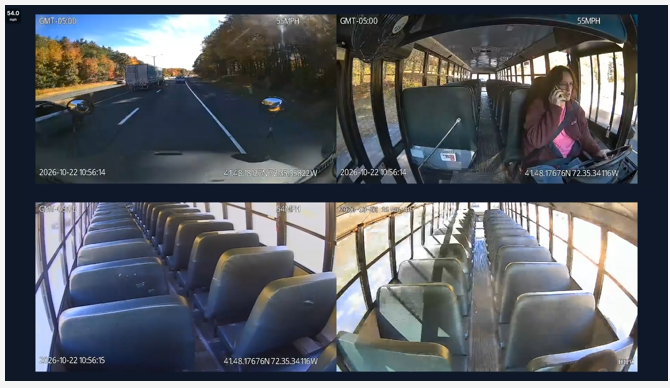
Four Camera Views — A Clearer Picture of Every Journey
Understanding what happens on a school bus requires more than a single camera angle.
Common Challenges
- Blind spots in visibility across the bus.
- Limited information about driver behavior and passenger activity.
- Difficulty understanding the circumstances surrounding an incident.
- Delays obtaining useful footage for review.
How SafeSight Helps
Road and Driver Visibility
A dual-facing dash camera captures the road ahead and the driver-facing view, supporting visibility into road conditions and driver behavior.
Interior Coverage
Two dome cameras provide additional views of the passenger compartment, helping transportation teams better understand activity on board.
A More Complete View
Together, the three physical cameras provide four views to support incident investigation, safety monitoring and operational accountability.

Live Video Access — Review Events Without Waiting for the Bus to Return
When an incident occurs during a route, waiting for a vehicle to return to the yard can delay access to important information.
Common Challenges
- Limited access to video while buses are operating.
- Time-consuming incident investigations.
- Difficulty understanding events as they unfold.
- Delays reviewing driver behavior and road conditions.
How SafeSight Helps
Access Live and Historical Video
Authorised staff can access available video remotely, supported by cellular connectivity powered by T-Mobile’s nationwide network. This allows events to be reviewed without waiting for buses to return to the yard.
Support Faster Incident Review
Video can help transportation leaders understand what happened, inform follow-up decisions and maintain a clearer record of incidents.
Improve Situational Awareness
Remote video access gives designated staff another source of information when assessing incidents involving drivers, passengers or road conditions.
Parent App — Keep Families Informed and Reduce Office Calls
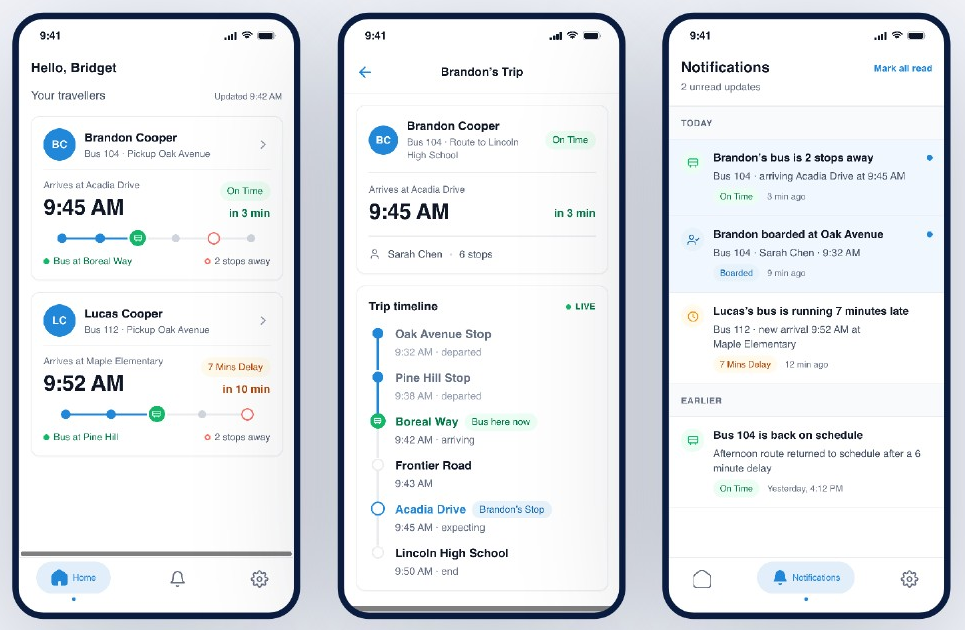
When parents don’t know where their child’s school bus is or when it will arrive, they often call the school office for updates. These repeated enquiries create extra work for administrative staff and leave families waiting for information.
Common Challenges
- Parents unsure when their child’s bus will arrive.
- Frequent “Where’s the bus?” calls to school offices.
- Administrative staff spending time responding to routine transport enquiries.
- Difficulty keeping families informed about bus journeys.
How SafeSight Helps
Provide Live Bus ETAs
The Parent App gives families access to bus location information and live estimated arrival times, helping them plan around their child’s journey.
Reduce Routine Office Calls By 80%
With journey updates and ETAs available through the app, parents have less need to contact the school office for arrival information.
Keep Families Informed
Alongside school monitors, the Parent App makes live ETA information more accessible to families and school communities.
AI-Powered Safety — Identify Risky Driving Behaviors and Road Events
Common Challenges
- Difficulty consistently identifying risky driving behaviors.
- Limited visibility into distraction and seat belt use.
- Time spent reviewing footage to find specific events.
- Challenges turning recorded incidents into practical driver feedback.
How SafeSight Helps
Driver Behavior Detection
Features include detection for selected behaviors such as mobile phone use, driver distraction, seat belt use and signs of fatigue, subject to feature availability.
Road Safety Alerts
Available road-event detections include forward collision warnings, lane departure warnings, pedestrian collision warnings, headway monitoring and rolling-stop detection.
In-Cab Alerts
The system can provide audible feedback to drivers for supported events, helping bring attention to potential risks during a journey.
Driver Coaching & Accountability — Turn Video into Action
Camera footage is most useful when districts can turn what it reveals into meaningful improvements.
Common Challenges
- Repeated unsafe behaviors going unaddressed.
- Inconsistent driver feedback.
- Limited ways to measure improvement over time.
- Difficulty linking incidents with follow-up coaching.
How SafeSight Helps
Review Driver Performance
Use video, safety events and driver performance data to identify behaviors that may require attention.
Deliver Targeted Coaching
Supervisors can review events with drivers, provide specific feedback and track progress through coaching workflows.
Measure Improvement
Driver scorecards and performance insights help transportation teams monitor trends, recognize improvements and support more consistent safety practices.
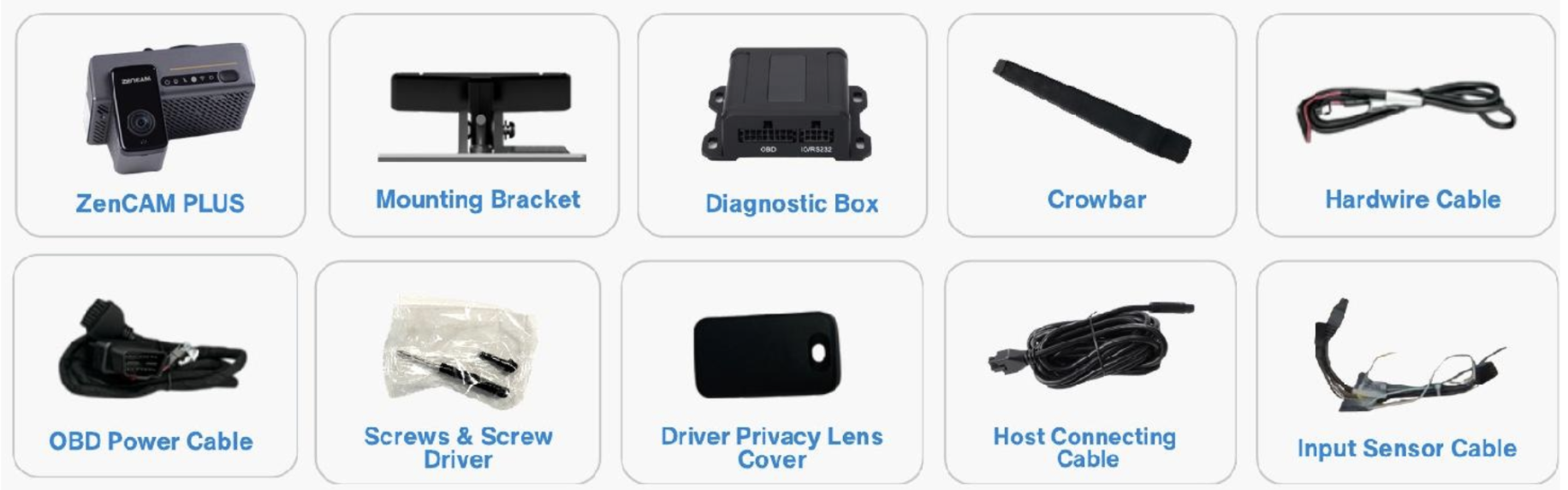
What’s Included in the SafeSight Kit

Why Deploy SafeSight with Premier Wireless?
A Connected Solution, Powered by T-Mobile
Powered by T-Mobile connectivity, SafeSight combines onboard camera technology with cellular connectivity to support remote video access and greater fleet visibility.
Deployment Built Around Your District
Every district has different routes, vehicles and operational requirements. Premier Wireless helps plan and configure the solution around your fleet, supporting a practical approach to implementation.
One Partner from Planning to Deployment
Premier Wireless brings together technology, connectivity and deployment expertise, helping districts navigate implementation with one accountable partner rather than coordinating separate providers.
Ongoing Support for Your Operations
As your district’s needs evolve, Premier Wireless can help support your connected technology and assess how the solution fits into your wider transportation operations.
Give Your Transportation Team a Clearer View
Transportation teams need useful information to investigate incidents, identify potential risks and support drivers.
SafeSight combines multi-view camera coverage, connected video and AI-powered safety capabilities to help districts strengthen visibility and accountability across their transportation operations.
Ready to explore SafeSight for your school buses?